Hopscotch
A digital loyalty card wallet. Invisible until the moment it matters.
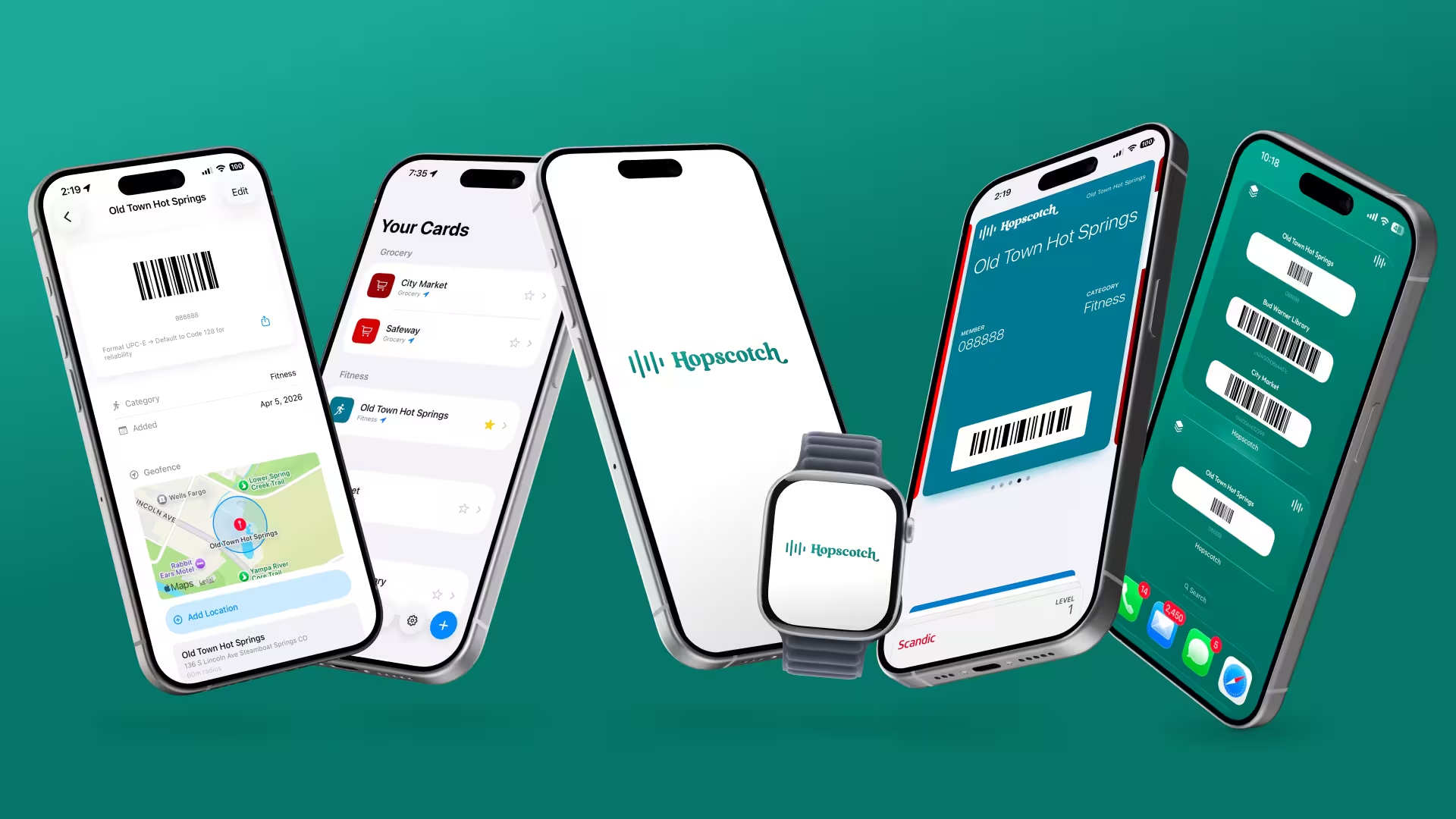
A plastic loyalty card is a solved problem until you forget it or lose it. Hopscotch puts your cards on your phone, your watch, your lock screen, and your digital wallet — then uses your location to surface the right one automatically.
The guiding principle is a zero-friction, integrated experience — after setup, a user should never have to think about the app. It just appears the moment they need it. Hopscotch spans both iOS and Android, and works on the surface a user prefers: phone, watch, widget, or wallet.


3 weeks
Field observation to shipped
2 platforms
iOS + Android
8 surfaces
Phone, watch, wallet, widget — on each
1 + 12
Human + AI agent team
Physical cards get lost in a digital world. I wanted mine to behave like a smart device — to show up the moment I need them, then get out of the way. That's why I created Hopscotch.
My Role
Product lead and sole designer. Took Hopscotch from a field observation to shipping across every surface — directing a 12-agent AI team across engineering, design, product, marketing, legal, and finance.
How I built it
The Craft Underneath
I directed twelve specialized AI agents — scoped like a real org — reviewing, steering, and sharpening rather than writing every line. Where needed, I jumped in to design a specific screen (watch, widgets, wallet) and used my Claude Code agent team to bring the designs to life with pixel-perfect accuracy.
I review, steer, and sharpen — every call mine
12 AI agentsEngineering
2 agents
Design
2 agents
Product
2 agents
Marketing
2 agents
Legal
1 agent
Finance
2 agents
Docs
1 agent
16
custom skills I authored to sharpen each agent
18 files
deep — the reference library behind a single skill
Sonnet → Opus
tuned to run token-efficient, then verify against more advanced models
In parallel
many agents at once, burning through disjoint tasks
One designer, directing — two native apps, research to market, in weeks.
The Design Principle
Invisible when working
I designed Hopscotch for myself first. I already had the plastic key cards — what I wanted was a loyalty wallet that behaves like a smart device instead: the right card showing up the moment I need it, then getting out of the way. The best version is the one you never consciously open.
Once I'd shipped that first version, it was clear other people wanted the same thing. So I designed it out across every surface someone actually reaches for — the lock screen, a widget, the watch — each native to that surface, never shrunk down from the phone. That constraint is the whole story of the build.
The Differentiator
Arrive, and it's already there
This is the one thing nothing else in the category does well, and the reason Hopscotch exists. You set a store's location once, and then you never open the app again. Cross into the geofence and the phone wakes Hopscotch in the background: the right card surfaces itself — a notification, the barcode on your lock screen, the card already on your wrist.
Every other surface is in service of this one moment — your phone intelligently surfacing the right card the instant you arrive, before you've even thought to look for it. You glance down and scan.
The one feature nothing else gets right
Set a location once; after that you never open the app. Cross the geofence and the card surfaces itself — lock screen, watch, wallet. The best moment is the one where you don't touch your phone.
Version 1
From imagination to my pocket
I'd used Stocard for years, and when it went away I got curious — could I just build the thing I missed? So I started small and specific: one card (my gym), a geofence around it, and a light brand guideline to give it some spunk. With Claude Code as a collaborator, going from my imagination straight to a working app on my phone felt like magic.
Then I put it in my pocket and used it — and two early learnings set the tone for everything after:
- 1
Depth — across every card
One gym card quickly became my whole wallet: coffee, groceries, the library. To truly replace the stack, it had to scan whatever barcode I handed it — not just the easy ones.
- 2
Flexibility — across every surface
One card on one phone was never enough. I wanted it on my wrist, on my lock screen, wherever I was already reaching — so it had to work on every surface a person actually uses, not just the one I started on.
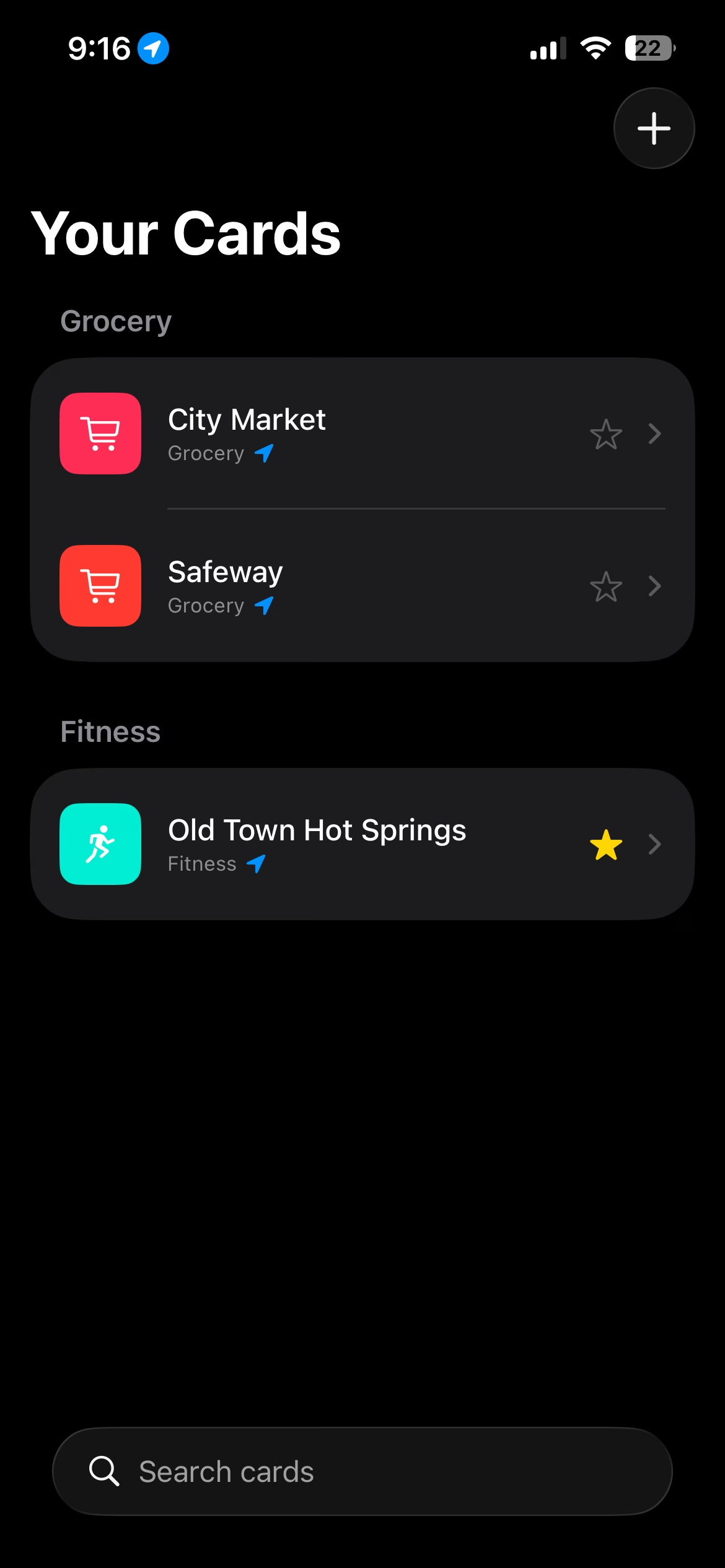
The wallet, grouped by category. Color and icon make a card identifiable at a glance, before you read a word.
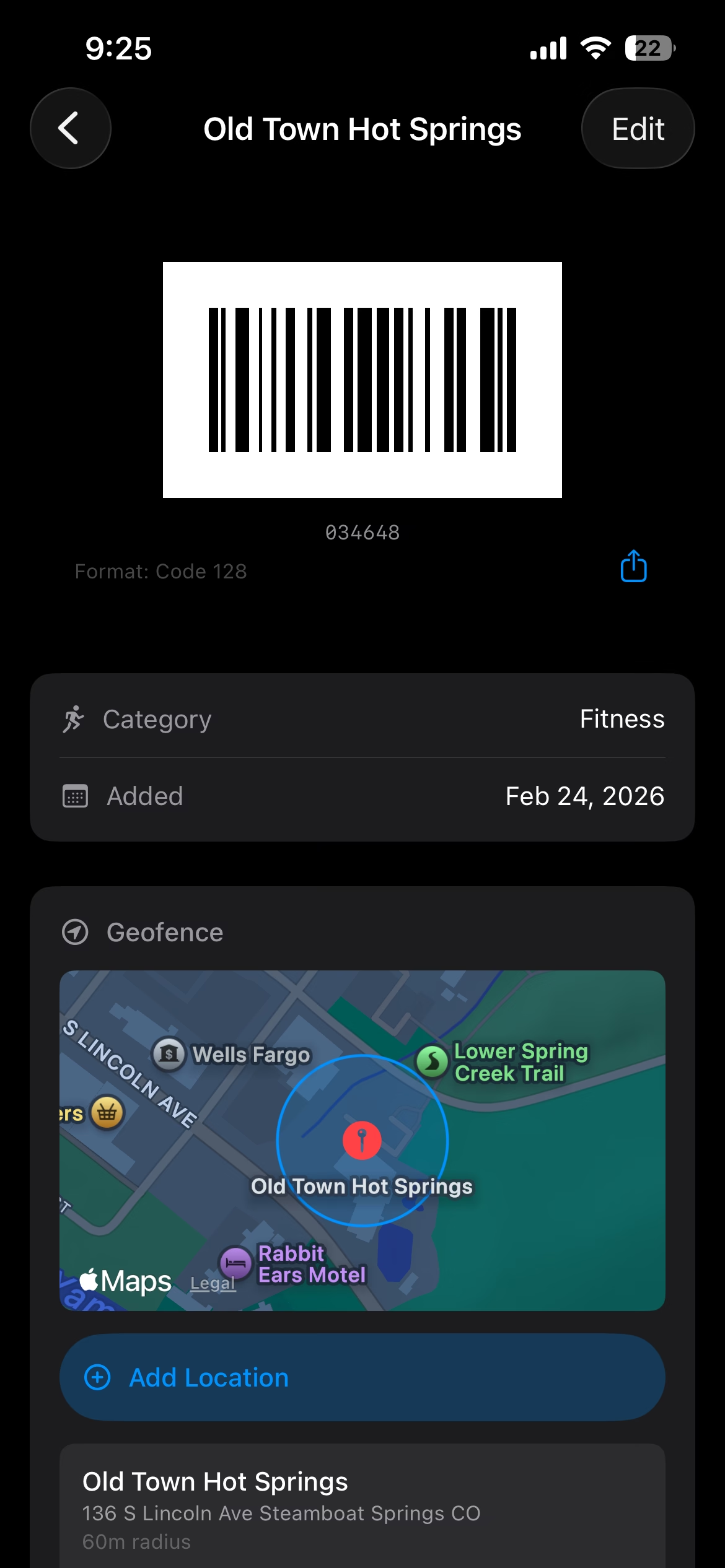
Card detail at the proportion of a physical card: scannable content on top, metadata below — one clear reading order.
Validation
Two signals, from both sides of the counter
I hadn't planned to test any of this. Both signals came from carrying the app around the town I live in — and together they described a product with two sides instead of one.
“Wait! How did you do that?”
— a gym employee, mid-scan.
I was checking in at the gym the way I always did — phone out, barcode on the screen — and the employee scanning it stopped to ask what app that was. They scan barcodes all day. Mine was the one that made them look up.
That question is what made me reach out to the gym about partnering to get Hopscotch into the hands of other members — and the moment it stopped being a personal tool.
The consumer side
When people who scan barcodes all day stop to ask about yours, the problem isn't only yours. That's what reframed a personal wallet as the front end of something two-sided.
“I would use that alongside Toast.”
— Jason P., a local restaurant owner.
The second signal came from the other side of the counter. Jason, who runs four restaurants here in Steamboat, looked at Hopscotch and didn't see a loyalty app — he saw an advertising channel he couldn't buy anywhere else.
What made that credible is that he wasn't a business without a rewards program, looking for one. All four of his restaurants already run Toast rewards, and he had no intention of dropping it. He was pointing at the one thing his POS structurally cannot do: reach a customer who isn't already standing at the register.
The business side
His own example: someone lands at the Steamboat airport, and their phone knows they're back in town — so the restaurants they already hold rewards with can say welcome back, with an offer, before that visitor has decided where to eat. A POS rewards program can only act at checkout. The geofence I'd built for myself is the piece that turns a rewards list into a place-aware channel.
Two conversations I never scheduled, pointing at the same product from opposite ends: one person wanted the wallet, and the other wanted a way to reach the people carrying it.
The Iterations
One principle, every surface
Alongside all of that, the app grew one surface at a time, and each addition was intentionally crafted for the surface it lived on: the lock screen, the widget, the wallet pass, and the watch each answer a different question, in a different amount of space, under different rendering rules.
What stayed constant was the learning that even within a unified design system like iOS, each surface has its own mental model to design around.
Seven iterations, one principle
- V1
Scan, store, surface
An iOS wallet that read a barcode from the camera and used location to surface the right card. My gym card was the first one in.
- V2
Every card, not just one
Seven barcode formats, and a picker that teaches the format instead of hiding it — because a card that won't scan destroys trust at the register.
- V3
On the home screen
Widgets — medium, large, and lock screen — sorted by proximity, so the card you need is the one you see.
- V4
On the lock screen
Apple Wallet passes. The barcode itself appears on the lock screen the moment you arrive. No app to open.
- V5
On the wrist
An Apple Watch app and complications — the whole wallet reduced to a glance and a single binary: are you near a store right now?
- V6
The wrist, redone
The Watch remake: a Nearby carousel, the barcode rendered in-place so the clock and chrome disappear, every value measured from device truth.
- V7
A glanceable complication
The Nearby complication: a filled arrow for presence, a trail that grows with the count. Read pre-attentively, in the ~200ms a raised wrist actually gives you — no words, no tap, no app.
- Next
The rest of the wallet
Data cards — insurance, prescription, warranty, registration — for everything in a physical wallet that has no barcode to scan.
The same idea on every surface: the right card, already there. A filled dot shipped; the outline marks what's next.
Cross-Platform
Then it had to work for whoever walked in
A personal tool only has to run on my phone. A loyalty network has to run on everyone's. The moment the gym partnership got real, so did the requirement: a sign on the counter shows one QR code, and whoever scans it — iPhone or Android — has to land on an app that feels native and just works. Anything less re-introduces the exact friction the product exists to delete: "I can't put my card on my phone."
So Android isn't a port. It's a clean rebuild in Kotlin and Compose, native to Material the way the iOS app is native to the Human Interface Guidelines. The discipline was to diverge only where the platform forces it — and to name the reason every time.
- 1
What Material expects, not what iOS did
A FAB and a bottom sheet instead of a toolbar +; long-press menus instead of swipe actions; Material You dynamic color, with the Hopscotch teal locked for the moments that matter.
- 2
Some things only Android can do
A persistent, expandable notification puts the barcode itself in the shade — no app to open at all. And with no hard cap on geofences, Android tracks every store you visit, where iOS has to ration them.
- 3
The platforms taught each other
The bottom tab bar — Wallet, Nearby, Settings — started on Android because it's far more reachable one-handed. It worked so well I ported it back to iOS. The usual hierarchy, reversed.
What that bought
Full Android parity — phone, watch, widget, wallet — in roughly two weeks of build, directed across an AI agent team. Both apps are live today, on the App Store and Google Play.
Seamless Experience
Coordinating moments for a seamless experience
Setup happens once, on the phone. After that, three surfaces work together so the right card is always already there — without ever opening the app: a barcode on your lock screen, a card on your wrist, and the right card a glance from your home screen. Same promise, sized to three different moments.
Wallet — the barcode on your lock screen
Putting the barcode on the lock screen meant issuing a Wallet pass — and that was a non-trivial decision, not a task. Neither platform lets an app sign its own passes, so it takes a small server: each pass is built and cryptographically signed off-device, then added through a secured handshake before the OS will place it on your lock screen. Real infrastructure for what looks like a simple card.
But the harder problem wasn't the signing — it was the lock screen itself: prime, contested real estate where a fleeting notification and a persistent pass compete for the same glance. Which should surface, and when? That tension is the real design problem — and it turns out both answers are right, for different moments.
Two ways to surface the same card — the moment decides
Monday, June 22
9:41
your card is ready
Temporary, dismissible — right for a one-and-done scan, like checking in at the gym.
Monday, June 22
9:41
your pass is ready
Stays on the lock screen — right for repeated scans, or a quick coffee or grocery run where you want it to stay up.
Same barcode, two interactions. The lock screen is contested real estate — a fleeting banner and a pinned pass each win a different moment.
Watch — designing for the smallest surface
The watch unapologetically forced the deepest thinking of the project: every element, affordance, and interaction had to prove itself necessary and be immediately intuitive.
- 1
The card list is a carousel
The natural watch gesture for a collection — one card at a time, flicked past with your thumb.
- 2
Nearby gets its own spot
The nearby view is a horizontal page that sits above the card list in a place of its own, so the moment you're at a store the one right answer is already front and center.
- 3
Conveying dynamic meaning through a complication
Its location chevron tells you how many cards are nearby at a glance: hollow for none, filled for one, and splitting into two or three as that many come into range.
- 4
The barcode fills the whole face
Open a card and the white code goes edge to edge — the watch's clock and chrome hidden — so a scanner gets the biggest, cleanest target a 40mm screen can give.
Every value in the layout was measured twice — once in Figma, once on device — because at 40mm a 2-pt error is a visible mistake. This was the one screen I fully rebuilt after testing.
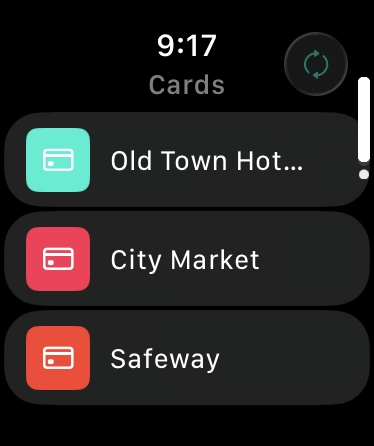
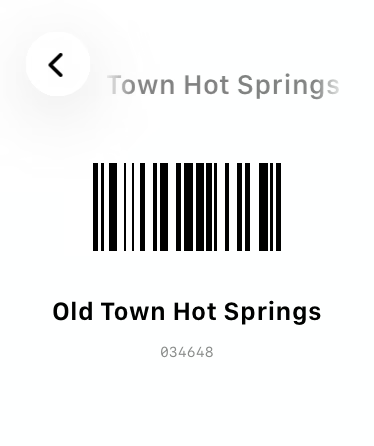
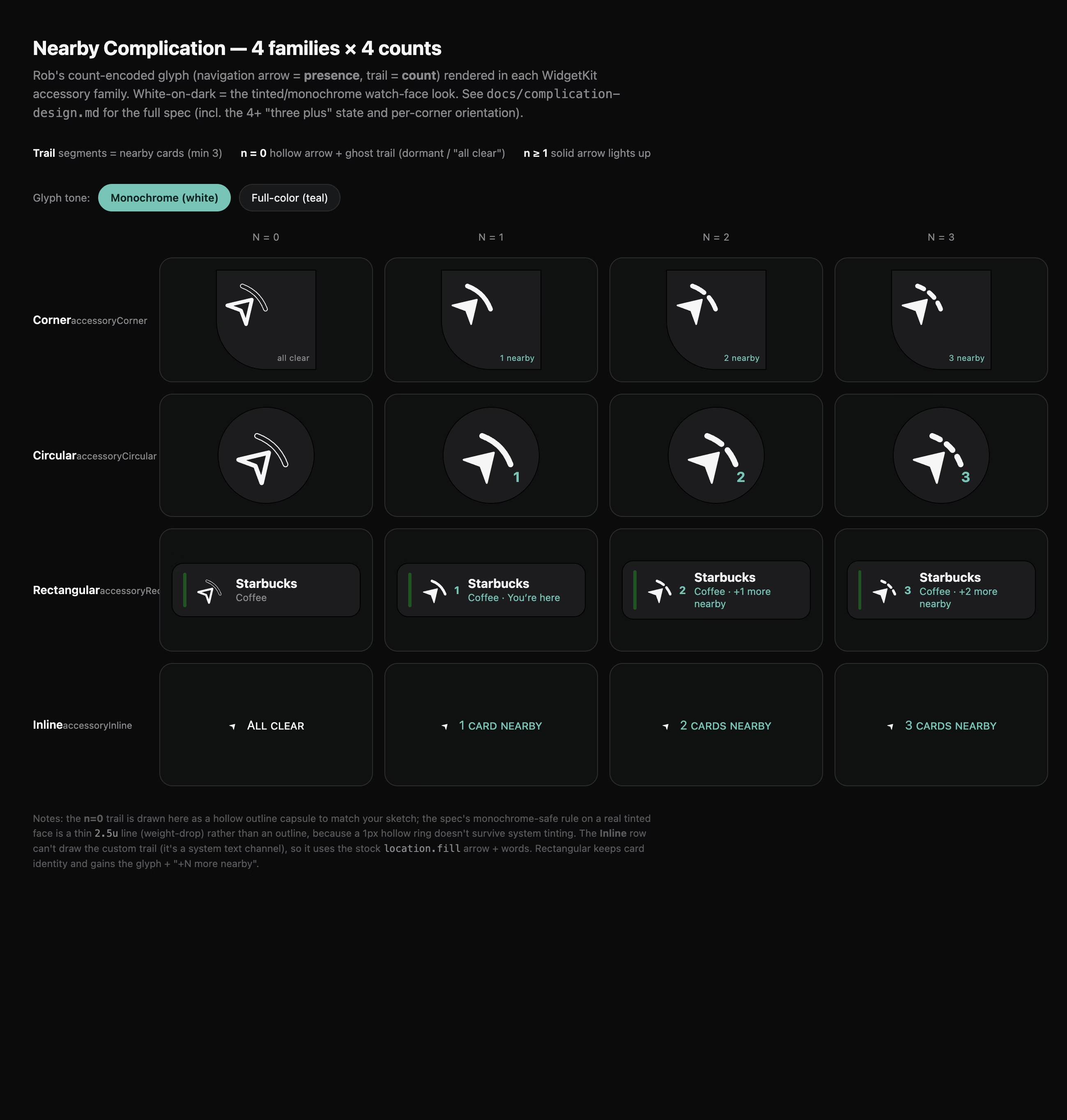
The deck, the in-place barcode, and the complication — the wallet reduced to a glance. The barcode view forces light mode regardless of the watch face.
The constraint that cost us
Optical scanners need dark bars on a light background, so every surface with a scannable barcode is forced to light — no exceptions. That one stung: it overrode a beautiful Android watch card we'd designed and loved. But a barcode a scanner can't read is a card that doesn't work, so function won anyway — and the honest version of "designed" includes the calls that hurt.
Widgets — a glance before you even unlock
The widget is the principle at its smallest: the right card, on the home or lock screen, before you open anything. iOS gives you a few fixed sizes; Android's adaptive grid reflows from 2×2 up to 4×4. Same job, two rule sets — and the same non-negotiable, that a barcode is only useful if a scanner can read it, so it forces light regardless of your wallpaper.
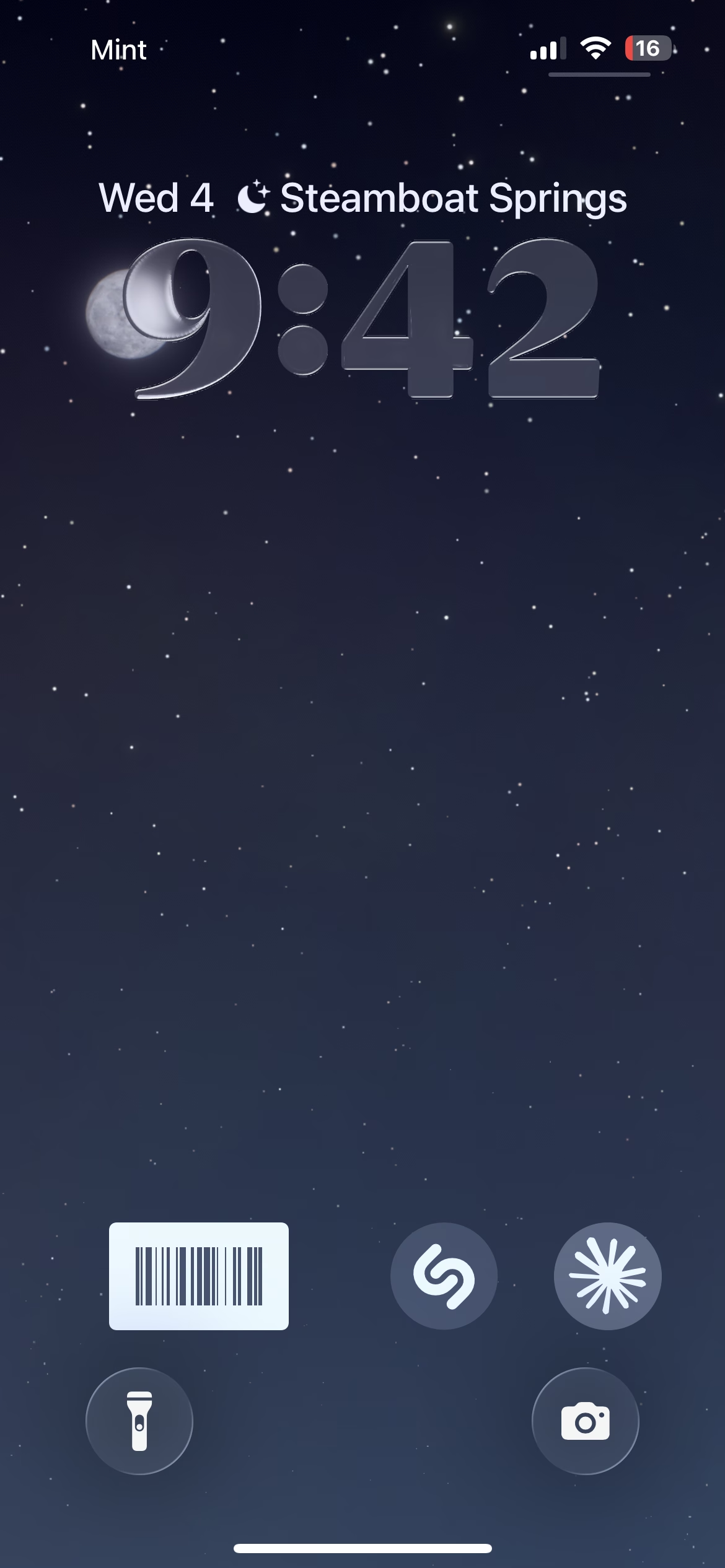
Lock Screen — the barcode the instant you raise the phone.
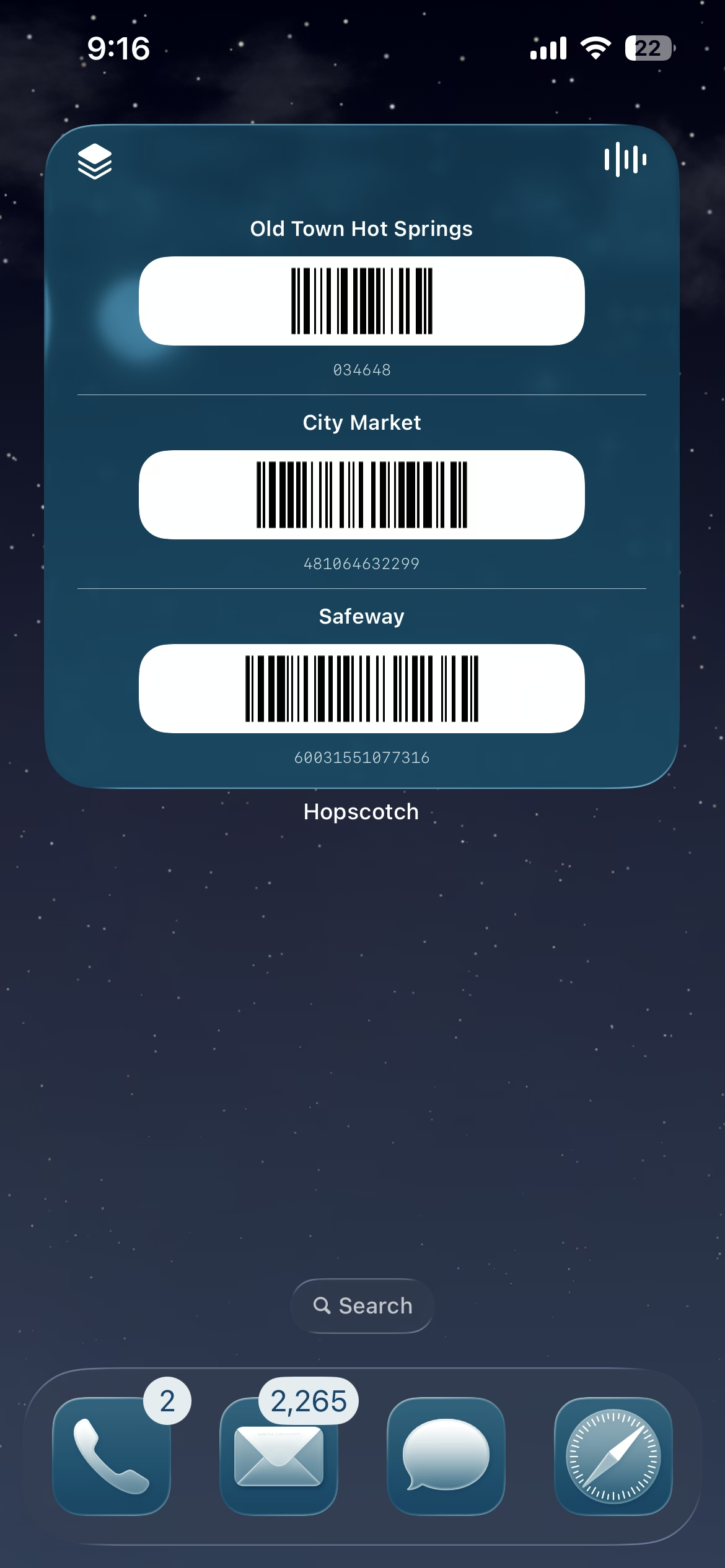
Home Screen — the nearest card, one tap from scannable.
Settings
Where the app explains itself
Hopscotch has no account and no onboarding, so the settings screen is the one place it explains itself — and I treated it as a design artifact, not a junk drawer of toggles. It answers the three quiet questions a careful person actually asks: what is this app doing, how much of it can I shape, and where do I go when something breaks.
The row that earns the most trust is the one people dismiss fastest — always-on location. So it's the one that says, in plain language, that your location is matched on-device and never leaves the phone. Every switch below it is a real decision the user gets to make, and there's a clear path to help — because products fail, and an honest one tells you where to turn when it does.
Every switch has a reason
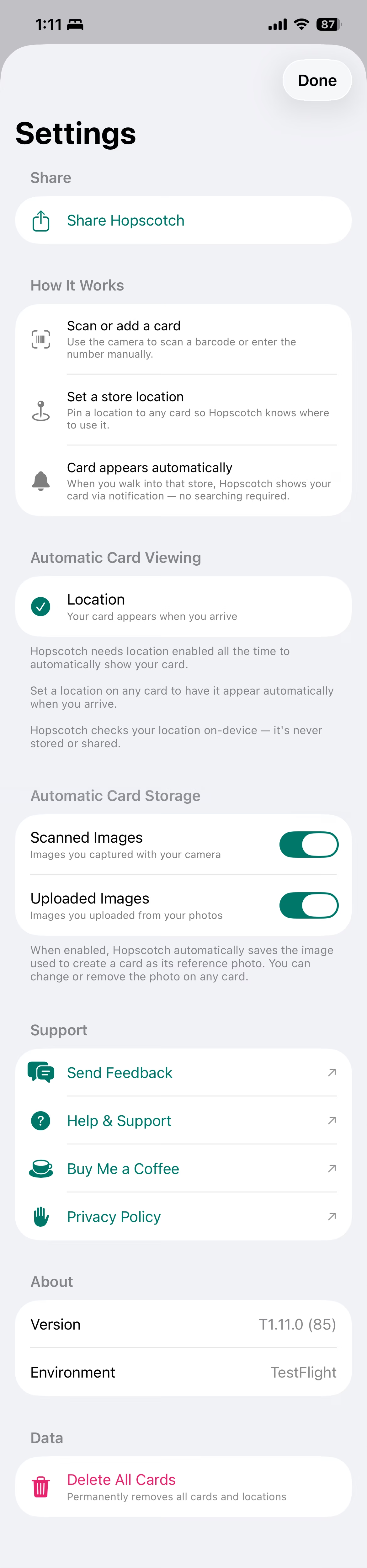
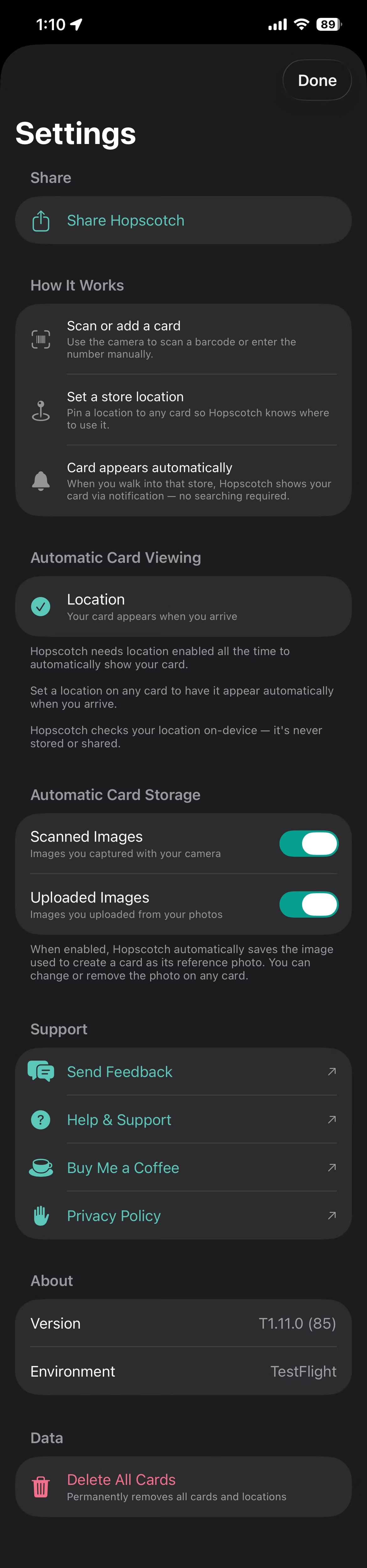
The settings screen as a design artifact — every row earns its place. Scroll the reasoning; the screen tracks along.
01 · Share
Virality, by design. The easiest loyalty app to use should be the easiest to tell a friend about — so the share affordance sits at the top, not buried.
02 · How it works
A 60-second explainer so new users get the whole product — geofence, widget, wallet — instead of treating Hopscotch as just another place to store a barcode.
03 · Automatic card viewing
The row most people would dismiss, so it carries the explanation: Always-on location is what surfaces the right card at the right moment — and Hopscotch never looks at where you've been.
04 · Automatic card storage
A quiet fallback. If a scanner ever chokes on the barcode, you still have a photo of the physical card. Trust through redundancy, not a feature anyone has to think about.
05 · Support & feedback
A real product with a real person behind it. The line is open because I actually want to hear from the people using it.
06 · Privacy policy
So you can confirm what the architecture already guarantees: no account, no analytics SDKs, nothing about you leaves your phone.
07 · Delete all cards
One tap to wipe everything and walk away clean. No dark patterns, no 'are you sure' maze — the same respect the rest of the app is built on.
Real World Testing
What real-world use teaches that a mockup can't
The geofence fired, "you're at the gym," I opened the app, and the Nearby tab was empty. A notification that says you arrived, followed by a blank screen when you expect a card — that's the product's entire purpose, failed.
The cause was two systems using the same word differently. Apple's geofence engine is generous — Wi-Fi, cell, hysteresis — and fires when you're roughly there. My Nearby check was unknowingly strict: it used a different method that re-derived your position from a single GPS reading — and indoors that reading can be 60–165m off, far enough to fall outside the location's circle and surface nothing. This wasn't just a bug fix; it was a decision about the cost of being wrong.
One buffer, three outcomes
GPS isn't a point — your reported location comes with an accuracy radius (the grey circle), up to 60–165m off indoors. Nearby checks that circle against the store's geofence. The fix is a buffer — and it changes which way the misses break.
The miss
false negative
A blank screen when you expect a card — the product's entire purpose, failed.
The fix
true positive
Add a buffer and the drifted reading still reaches the geofence — your real arrival, caught.
The cost
false positive
An extra card you didn't need — a glance you ignore. Harmless.
The geofence · what the notification uses
The GPS reading · what Nearby uses (solid = the reading, dashed = the buffer)
You · your true position
A buffer trades the one failure you can't afford — a blank screen — for the one you can: a card you ignore. When unsure, show the card.
That was the loudest lesson, not the only one. Every surface taught me something the plan got wrong — a handful of moments where I set out to do one thing and the real world insisted on another:
- 1
Not every barcode is an account code
iOS · AndroidThe gym card was a plain six-digit number that the app kept encoding as UPC-E — by capture and by hand — so it rendered fine but the register wouldn't read it. Research surfaced the clue: UPC-E comes from the product world, so the register needed Code 128 — the format account barcodes actually use, and a domain fact the digits don't reveal.
- 2
A barcode isn't the number you type
iOS · AndroidA barcode encodes more than the digits printed on the card — check digits, prefixes, control characters — so what a user types by hand often isn't what the code actually says. Since I couldn't assume a typed number matched the real one, I placed reminders across the app: if you entered a code by hand, it might be wrong — scan the original instead.
- 3
Render the watch barcode on-device
AndroidPlanned to pre-render barcodes on the phone and mirror the iOS approach; shipped them rendered right on the watch — the opposite call, because the Android watch had the tools the Apple one didn't.
- 4
Ship Wallet at launch, not "later"
iOS · AndroidPlanned to defer the wallet pass to a future phase; shipped it day one, because the barcode on the lock screen is the magic moment — deferring it would have deferred the point of the app.
- 5
Limit onboarding questions to when they're relevant
iOS · AndroidPlanned to ask for everything up front; shipped each question for the moment it actually matters — like requesting always-on location the first time someone saves a store, when they've just shown you, by acting, exactly why the app needs it.
Going Further
A paper punch card, a path to monetization
It started with the paper punch card, the one a shop hands you, that the person at the register punches or marks with a Sharpie every time you order, and that you lose long before it's full.
The ritual works; the card doesn't. Shops end up reprinting them constantly, handing the same regular their third or fourth. Many small businesses are stuck right there: not for lack of wanting something digital, but because every real option costs too much — the price, a modern POS, trained staff, and the budget and brain space to run it.
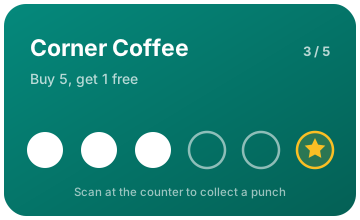
The same punch card, reborn in the app — no card to lose, and a punch is a QR scan at the counter.
Hopscotch is already built for exactly this. The wallet I made for myself is the supply side; a business platform is the demand side. A shop sets up its rewards in a simple portal, and the rest reuses what the app already does best: you walk in with Hopscotch, it confirms you're actually there, and you scan the shop's QR code at the counter to collect a punch.
And the demand isn't hypothetical. It's what Jason was describing back at the airport: not another rewards program — he already pays for one across four restaurants — but the ability to reach a customer the moment they arrive, which is the one thing his POS can't sell him.
The business model is the design decision
A genuinely useful free utility
The loyalty wallet that surfaces every card, everywhere — free, no account, no friction. So users get on and keep it on.
Businesses want that channel
A direct line to those regulars — so they join and pay $19/mo.
effectGrowth engine
Those users spread it
They carry it everywhere and tell other shops — so more businesses want the channel too.
The business advertises its program
It promotes its Hopscotch punch card to its customers — driving even more users onto the free app.
A genuinely useful free utility
The loyalty wallet that surfaces every card, everywhere — free, no account, no friction. So users get on and keep it on.
Businesses want that channel
A direct line to those regulars — so they join and pay $19/mo.
The business advertises its program
It promotes its Hopscotch punch card to its customers — driving even more users onto the free app.
Those users spread it
They carry it everywhere and tell other shops — so more businesses want the channel too.
It's a network effect that starts with the free side. Hopscotch is a genuinely useful free utility — the loyalty wallet that surfaces every card, everywhere — so users get on and keep it on. That audience is what businesses pay $19/mo to reach; once in, a shop promotes its own program, which puts even more users on the free app, who carry it everywhere and tell other shops — so more businesses want the channel too. Keeping it free and frictionless isn't generosity — the usefulness is the pull, and the pull is what spins the wheel.
What a small business pays per location, per month
Pricing decides who gets to play — Hopscotch sits below both, cheap enough the corner shop just says yes.
Hopscotch
$19/mo
Built for the independent business.
Square Loyalty
$45/mo
And it assumes the Square POS.
Toast add-on
$69–165/mo
And it assumes a full restaurant stack.
Square and Toast assume a modern POS, trained staff, and an IT budget — disqualifying for a two-person coffee shop. Hopscotch is $19, no hardware, no integration: 58% under Square's floor.
The real product
The paid side isn't the punch card — it's the channel. Letting a business drop a free coffee or a surprise punch straight onto a regular's lock screen is a direct line to their customers they've never had. It puts the neighborhood shop on the same footing as a chain with a loyalty app and an engineering team.
The Brand System
Familiar, trustworthy, approachable
Holding all of this together is a single recognizable object: the white barcode card, forced-white on every surface because a scanner needs it that way, consistent enough that it becomes the thing people recognize as Hopscotch. Around it sits a cross-platform system — a teal owned in a category of generic blue wallets, one shape language, and tokens that map across iOS, Android, and the web.
Inside the apps, the brand gets out of the way. Hopscotch wears each platform's own typeface — SF Pro on iOS, Google Sans Flex on Android — because a utility should feel like it belongs to the phone, not like a brand performing for you. The expressive voice, Fraunces and Outfit, is saved for the web, where we're meeting someone for the first time and personality earns its place.


Logo set in Regards — drawn once, then outlined to vector.
Marketing palette
Hopscotch Teal
Brand · logo · primary
#047568
Deep Teal
Depth · pressed states
#036157
Mint
Light accent · highlights
#5BC7B8
Ink
Text · near-black
#151515
White
Space · the card ground
#FFFFFF
Type · steered by the OS
iOS
SF Pro
Apple's system face — the app feels native to the iPhone.
Android
Google Sans Flex
Google's variable face across the Material 3 scale — native to the phone.
Web
Fraunces + Outfit
The expressive pairing, display serif + sans — saved for marketing, where we meet someone first.
Brand System
The whole system — color, type, shape, motion, components — documented as a standalone, cross-platform guide.
What Shipped
2
Platforms
8
Surfaces
0
Dependencies
7
Barcode formats
iOS and Android, each across phone, watch, wallet, and widget — eight surfaces in total, built from zero third-party dependencies. Both apps are live: iOS on the App Store, Android on Google Play. The business-side marketplace platform is in active development. Seven barcode formats supported.
- Live on both stores: iOS on the App Store, Android on Google Play
- Two platforms, eight surfaces — phone, watch, wallet, and widget on each
- Zero third-party dependencies — runs entirely on first-party platform frameworks
- Seven barcode formats supported, four Watch complication families
- Two-sided marketplace model underway: consumer apps shipped, business platform in development
What I Learned
Hopscotch is the first project where I built with AI. I directed a twelve-agent team — engineering, design, marketing, legal — and authored my own custom skills to sharpen what each one produced, reviewing and steering every output rather than writing every line. I owned the build end to end, not just the designs — which is what made one person shipping two native apps, across eight surfaces, in weeks even possible.
The magic is in making the system feel seamless. A geofence that surfaces the right card, a pass that signs itself, a watch that stays in sync: the smooth front end rests on a stack of backend services working in concert, and orchestrating them so the seams never show was the real work.
Designing for the surface's intent creates uniformity. A notification on the phone, a complication that fills on the watch, the real barcode on the lock screen — flattening those differences to save effort would have betrayed the principle they exist to serve.
Making decisions for the user lowers cognitive load. What's hard about saving a card isn't the interface — it's being handed choices you have no basis to make. Where another app surfaces every barcode format as an option, we made the call: auto-detect picks the right one, so no one needs to know the first thing about barcodes. The full set stays a tap away for the curious, but the default is a decision, not a question — and lowering cognitive load by deciding well on someone's behalf is what 'designed' actually means.
What this demonstrates